
My Work Arrangements
UQ is committed to maintaining a vibrant University environment, while also accommodating flexible work for staff. Flexible work allows you to vary your work arrangements to provide greater flexibility to balance your personal and professional lives.
The flexible work options available to staff will depend on your employment type, provisions under UQ’s Enterprise Agreement and personal circumstances.
From 2 November 2026, the Standard Hours Arrangement will be the default award for all new full-time and part-time professional staff (HEW 1-7).
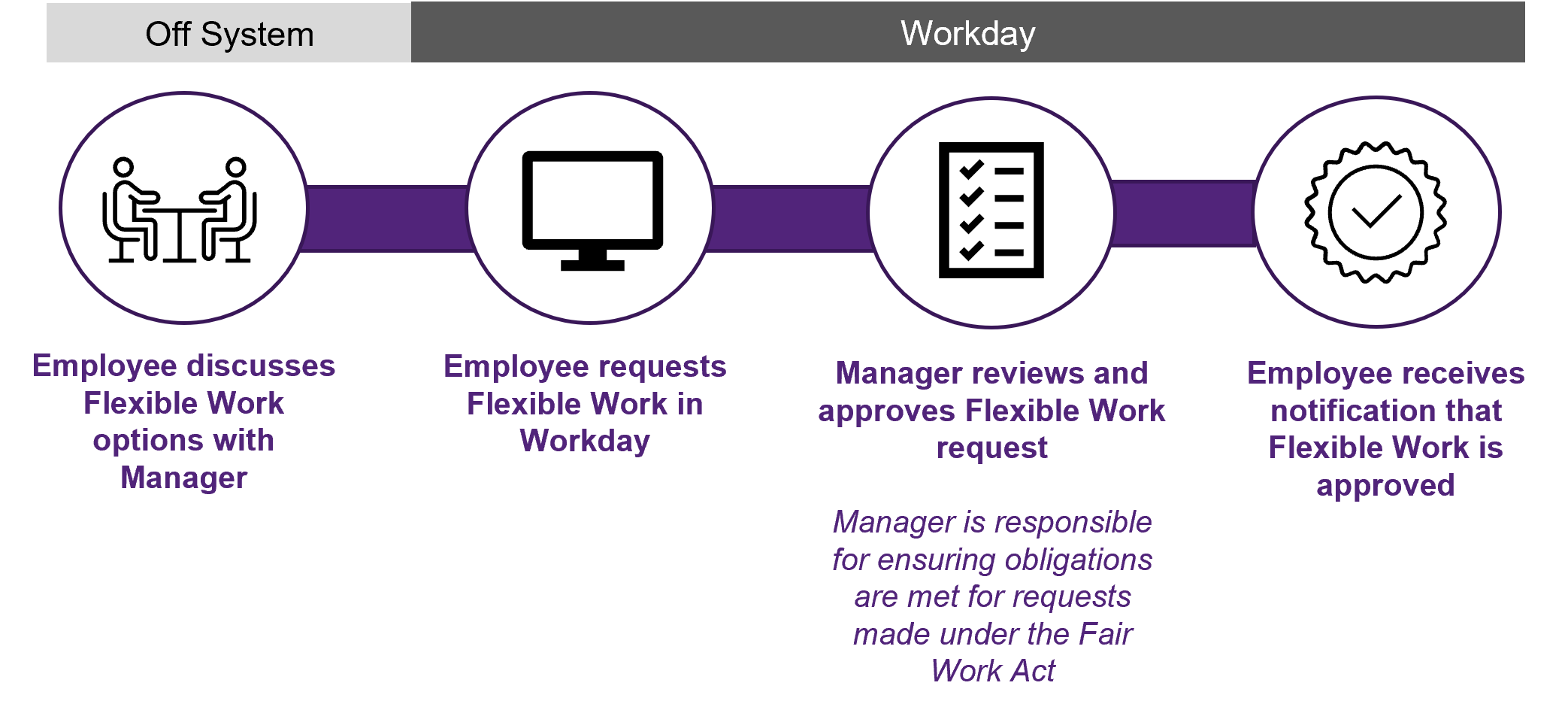
Please refer to the information on the Flexible Work page and discuss which options may be suitable for you and the requirements of your work area with your manager before submitting a request. Once you have agreed the best option, you can submit a request for flexible work in Workday.
Process Flow
Flexible work arrangements for HEW 1-7 Professional Staff
Full-time and part-time professional staff (HEW 1-7) may work under either a Standard Hours Arrangement (default) or an approved Flexible Work arrangement, subject to the provisions of UQ’s Enterprise Agreement.
Changing your hours or work pattern
Changes to hours and work patterns are managed through the Flexible Work Request process. Select the arrangement that reflects your proposed employment fraction (full-time or part-time). If your hours are not changing, select your current arrangement. The form will then prompt you to enter your proposed work pattern and any other required changes.
Example:
Mikael currently works full-time under a Flexi-time Work arrangement. After discussing his circumstances with his manager, he decides to reduce his hours to part-time. His manager agrees to the change.
In Workday, Mikael navigates to:
Menu → Personal → My Flexible Work → Request Flexible Work Arrangement
He enters the relevant pay period dates that he will begin working part-time and selects Flexi-time (Part Time). This allows him to update his Flexible Work Arrangement from full-time to part-time. He will also be able to change his work pattern through this process.
Request a Standard Hours Arrangement
PDF, 867 KB
This guide is for Full-time or part-time professional HEW 1-7 staff, excluding UQ Venues staff and shift workers.
Best for: Staff who work ordinary hours as per their standard work pattern and do not require additional flexibility.
Request a Fixed Hours Arrangement
PDF, 928 KB
This guide is for Full-time or part-time professional HEW 1-7 staff, excluding UQ Venues staff and shift workers.
Best for: Staff who work a predictable work pattern where exact hours are known and consistent, that may differ from a standard work pattern.
Request a Flexi-time Arrangement
PDF, 901 KB
This guide is for Full-time or part-time professional HEW 1-7 staff, excluding UQ Venues staff and shift workers.
Best for: Staff who want flexibility in their start and finish times and the ability to accrue a limited amount of additional time (when supported by organisational need) that can be used later.
Request a Voluntary Banked Time (VBT) Arrangement
PDF, 884 KB
This guide is for Full-time or part-time professional HEW 1-7 staff, excluding UQ Venues staff and shift workers.
Best for: Staff who want flexibility in their start and finish times and the ability to accrue larger amounts of additional time (when supported by organisational need) for future planned absences.
Other time, attendance and location requests
Flexible Work - Change of Hours
PDF, 1.34 MB
This guide is for UQ Venues staff, shift workers, HEW8+ professional staff, and academic staff.
A Change of Hours Request can be used when staff want to change their ordinary contracted hours of work. This may include increasing or reducing hours.
*HEW 1-7 professional staff need to manage change of hours requests through the Flexible Work arrangement request form.
Flexible Work - Change of Work Pattern
PDF, 1.35 MB
This guide is for HEW8+ professional staff and academic staff.
A Change of Work Pattern Request is used when a HEW8+ staff wants to formally change how their hours are distributed across the week, without changing the total hours worked.
*HEW 1-7 Professional staff need to manage changes to work patterns through their Flexible Work arrangement request form.
Flexible Work - Work From Home
PDF, 1.35 MB
This guide demonstrates how employees can initiate a request to work from home through Workday in their Worker Profile via the 'Actions' button, selecting 'Job Change' then 'Request Flexible Work Arrangement' or via the My Flexible Work Application.
Prior to completing a flexible work request in Workday for working from home, change of location (overseas or interstate) please complete the Working From Home - Work Area Self Assessment. Once complete, this will be required to be uploaded as part of your request.
Flexible Work - Change of Location (Interstate)
PDF, 1.25 MB
This guide demonstrates how staff can request to work temporarily from another Australian state.
Requests for flexible work that involve working from an interstate location for extended periods of time and/or as a principal place of work will only be permitted in exceptional circumstances. Managers will not consider such a request until the staff member has provided their manager with confirmation that the proposal has been considered and received preliminary approval from an officer at management Level 3 or above.
A Working From Home - Work Area Self-Assessment must be completed prior to starting your Change of Location Request in Workday. Please have a copy ready to be uploaded to your Workday request.
Flexible Work - Change of Location (Overseas)
PDF, 1.28 MB
This guide demonstrates how staff can request to work temporarily from an overseas location.
Due to tax implications, insurance requirements and other considerations, requests for flexible work that involve working from an international location will be permitted only in exceptional circumstances. Managers will not consider such a request until the staff member has provided their manager with confirmation that the proposal has been considered and received preliminary approval from an officer at management Level 2 or above.
*Any arrangements for staff to work interstate or overseas need to be approved in consultation with HR Client Partnering and Global Mobility due to insurance and tax implications.
End Flexible Work Arrangement
PDF, 1.25 MB
This guide demonstrates how staff can end the following types of Flexible Work:
Working from Home
Change of Location (interstate or overseas)
*HEW 1-7 professional staff who wish to change or end their current Flexible Work arrangement need to do so as part of a new request.
Working additional hours (overtime and TOIL)
Pre-approval to work overtime
PDF, 1.22 MB
This guide outlines the process to be used by HEW Level 1-8 Professional employees seeking approval to work overtime or take time off in lieu of overtime.
Please Note: Working overtime hours is not automatic and must be pre-approved by Management level 7 as per the University’s HR Sub-Delegations Policy.
Payout of Time Off in Lieu (TOIL)
PDF, 1.07 MB
This guide outlines the process to be used by HEW Level 1-7 professional employees using local timesheets to request to be paid out their accrued Time off In Lieu (TOIL) in the twice per calendar year process; and
HEW Level 1-8 Professional employees seeking adhoc payment for time off in lieu of overtime (TOIL) if it was not possible to take the time off within 30 days of working the overtime hours.
Close Down Work Arrangement December 2025
Close Down Work Arrangement December 2025
PDF, 1.44 MB
This guide demonstrates how employees can request to work over the close-down period through Workday.
Close Down request for Flex/VBT or TOIL December 2025
Close Down request for Flex/VBT or TOIL December 2025
PDF, 1.45 MB
This guide demonstrates how employees can request to utilise Flex/VBT or TOIL over the close-down period through Workday.
Employment Confirmation
Request Reference Letter
PDF, 972 KB
In Workday, a Reference Letter Request refers to a Statement of Service, Jury Duty Exemption, Higher Duties Allowance letter, or Confirmation of Employment.
Statement of Service
Is a statement advising that the employee is / was employed by UQ. It provides details of the employee's job history including employment dates, roles, and employment basis.
Confirmation of Employment
Is a letter confirming that the employee is currently employed by UQ. It provides details of the employee's current position, salary, allowances, employment status, probation status, and when they commenced at UQ.
Jury Duty Exemption
Is a letter seeking exemption from Jury Duty Service. The letter explains why the employee's absence due to jury service would have an adverse impact on their research / teaching / professional activities.
Higher Duties Allowance letter
Is a notification of higher duties allowance being granted to an employee on a short term secondment of less than 6 weeks. Amount is detailed per fortnight.
Separation
Submit My Resignation
PDF, 878 KB
A voluntary separation refers to when an employee chooses to leave UQ voluntarily (eg: through resignation, retirement or ill health). It doesn't include where an employee with multiple positions chooses to resign from one position but continue to work in their other positions.
Q. Who generates my Jury Duty Letter?
A: When a UQ employee requests a Jury Duty Letter, it will go to the Employee’s Manager for generation. Managers should view the Create Reference Letter guide.
Q. How do I resign from my position if I have multiple positions at UQ?
A. When a UQ employee resigns from one of their multiple positions but remains employed at the University in another position, this must be done through an offline resignation, submitted to Human Resources. Using the Resign or Terminate Employee option in Workday will end employment for ALL positions held by the employee at UQ.
Q. How do I end a Flexible Work Arrangement?
A. To end a Work From Home or Change of Location arrangement, submit an End Flexible Work arrangement request in Workday. To end a Flexi-time, VBT or Fixed Hours arrangement staff need to either request a new Flexible Work or Standard Hours arrangement in Workday.
Q. Can I work from home without an approved arrangement?
A. Any ongoing work from home arrangement must be approved through the appropriate process in Workday. A completed Work From Home Self-Assessment must be attached to Work From Home, Interstate Work and Overseas Work requests.
Q. I'm not sure which flexible work arrangement applies to me
A. Review the information on the Flexible Work page and discuss your circumstances with your manager.
Click on the image below to watch the Workday demonstration video displaying how to request a Flexible Work - Work From Home arrangement.
Can't find the answer?
Check the status of your requests and enquiries in my.UQ dashboard.